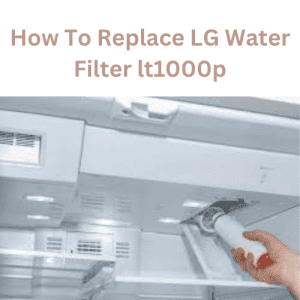
Do you know how to replace the LG Water Filter LT1000P? LG is one of the leading brands of refrigerators and water purifiers. Different fridge models have different filter locations.
All you need to do is check the model number, buy a new filter, locate the old one, open the system, and swap them out.
Replacement frequency depends on factors such as the quality of your tap water and how often you use your refrigerator.
However, it is generally recommended to replace the filter every 6 months or after it has filtered approximately 200 gallons of water.
Replacing the LG water filter LT1000P is a straightforward process you can do without a professional. Following the steps in the user manual or from a trusted source can help ensure a successful replacement.
LG Water Filter LT1000P
The LG LT1000P is a water filter designed for use in certain LG refrigerators. It is a genuine OEM (original equipment manufacturer) filter that is designed to remove impurities and contaminants from your drinking water, such as chlorine, bad taste and odor, lead, mercury, asbestos, and benzene.
The LT1000P is a vertical filter that is typically located in the upper-right corner of the refrigerator compartment.
It uses a high-grade carbon block that captures and reduces up to 99.9% of harmful contaminants. Replace the filter every 6 months or when the filter indicator light turns on.
How to Replace LG Water Filter LT1000P
Replacing the water filter in an LG refrigerator that uses the LT1000P filter is usually straightforward. Here’s a general guide:
Steps to Replace LG LT1000P Water Filter
Locate the Filter: The filter is typically located in the upper left-hand corner of the refrigerator interior.
Prepare for Replacement: Turn off the water supply to the refrigerator if it doesn’t have an automatic shut-off feature.
Twist and Remove
1. Rotate the old filter counterclockwise until it releases.
2. Pull the old filter straight out.
Prepare the New Filter: Remove the packaging from the new filter and remove any protective caps or seals.
Insert the New Filter: Align the new filter with the filter housing, then push it into place. Make sure it’s fully inserted and aligned properly.
Twist to Lock: Rotate the new filter clockwise until it locks into place. You may need to turn it firmly to ensure a secure connection.
Flush the System: Run water through the dispenser for a few minutes to flush out air and any carbon particles that might have loosened.
Reset the Filter Indicator: If your fridge has a filter indicator light, reset it according to the manufacturer’s instructions to ensure accurate monitoring of the next filter change.
Turn on the Water Supply: If you turned off the water supply, turn it back on.
Check for Leaks: Inspect the area around the filter for any leaks. Tighten the filter if needed.
Where is the Water Filter Located on the LG Refrigerator?
The water filter location in an LG refrigerator can vary depending on the specific model and design. However, in most LG refrigerators, the water filter is typically located inside the refrigerator compartment. Here are a few common areas where you might find the water filter:
Upper Right Corner
Look for a small, rectangular, or cylindrical housing in the upper right corner of the refrigerator compartment.
It may have a release button or a knob that you can twist to remove and replace the filter.
Upper Left Corner
In some LG refrigerator models, the water filter is in the upper left corner of the refrigerator compartment. It may have a similar housing or design to that described above.
Behind a Panel
In certain models, the water filter might be located behind a panel or cover inside the refrigerator. You may need to open the panel or remove a grille to access the filter.
For accurate information on the water filter’s location in your LG refrigerator, consult the user manual or contact LG customer support.
How to Replace the Water Filter in an LG Side-by-Side Refrigerator?
To replace the water filter in an LG side-by-side refrigerator, you can follow these steps:
Locate the Water Filter Compartment
In most LG side-by-side refrigerators, the water filter is usually located in the upper-right corner of the refrigerator compartment.
Open the Filter Compartment Door
Gently pull the filter compartment door outward to open it. The door may have a button or latch you need to press or pull to release it.
Remove the Old Water Filter
Inside the compartment, you will find the old water filter. Twist the filter counterclockwise to unlock it from its housing.
As you twist, the filter will come loose. Be prepared for some water to spill, so keep a towel or container handy to catch drips.
Properly Dispose of the Old Filter
Once you remove the filter, seal it in a plastic bag to prevent residual water from leaking. Dispose of the old filter properly according to your local regulations.
Prepare the New Water Filter
Remove the new water filter from its packaging. Remove any protective caps or seals from the new filter. Some filters may require soaking in water for a few minutes before installation, so check the instructions provided with the filter.
Install the New Water Filter
Align the new filter with the filter housing and insert it into the compartment. Rotate the filter clockwise until it locks securely into place. Make sure it is fully inserted and tightened.
Close the Filter Compartment Door
Push the filter compartment door back into place until it clicks or latches shut.
Reset the Water Filter Indicator
Some LG refrigerators have a water filter indicator light that you need to reset after replacing the filter. Refer to your refrigerator’s manual for instructions on resetting the indicator.
How Do You Reset LG Refrigerators After Changing the Filter?
To reset an LG refrigerator after changing the water filter, you can follow these general steps:
Locate the control panel on the front of your LG refrigerator. It is usually located above or inside the refrigerator compartment.
2. Look for the filter reset button. The exact location may vary by model, but it is typically labeled “Filter Reset” or “Reset.”
3. Press and hold the filter reset button for 3 to 5 seconds. You may need a pen or another small pointed object to press the button.
4. Wait for the indicator light on the control panel to change or go off. This indicates that the filter has been successfully reset.
5. Close the refrigerator door and check if the filter status or water filter light has been reset.
Remove Your LG LT1000P or Lower the Top Shelf
If you are referring to a refrigerator or a similar appliance that has an LG LT1000P filter or a top shelf that needs to be removed or lowered, I can provide some general guidance.
To remove the LG LT1000P filter, you can typically follow these steps:
1. Locate the filter compartment, which is usually at the back of the refrigerator.
2. Press the release button or turn the filter counterclockwise to unlock it.
3. Pull the filter straight out of the compartment.
To lower the top shelf, you may need to adjust the shelf-height settings, depending on your refrigerator model. Here are some general steps you can follow:
1. Remove any items on the shelf you want to lower.
2. Locate the shelf support clips or brackets that hold the shelf in place.
3. Depending on the type of shelf support, you may need to press a release button or turn a screw to adjust the height.
4. Once you have adjusted the shelf height, replace any items you removed from the shelf.
How Much Water to Flush Through the New Refrigerator Filter?
The amount of water you need to flush through a new refrigerator filter varies by model and manufacturer.
It is generally recommended to flush a certain volume of water through the filter to remove any carbon fines or other particles that may be present initially.
What Type of Water Filter Is Suitable for My LG Refrigerator?
To determine the suitable water filter for your LG refrigerator, you’ll need to check the model number of your refrigerator.
The model number will help identify the compatible filter LG recommends for your refrigerator.
1. Open the refrigerator door
2. Look for a label or sticker on the interior wall of the refrigerator
3. The model number is typically displayed on the label or sticker. It may be labeled as “Model,” “M/N,” or something similar
Once you have the model number, visit the LG website or refer to the refrigerator’s user manual to find the recommended water filter for your model. The user manual will provide detailed instructions for replacing the filter.
How to Purchase a Water Filter Which Is Suitable for My LG Refrigerator?
To purchase a water filter that is suitable for your LG refrigerator, you can follow these steps:
Identify the model number of your LG refrigerator
Look for a label or tag inside the refrigerator or on the back or side of the unit. The model number is usually a combination of letters and numbers, such as “LFXS30726S” or “LSXS26366D.” Please note the model number; it will help you find the correct filter.
Determine the type of water filter your refrigerator uses
LG refrigerators typically use either an internal or an external water filter. Internal filters are installed inside the refrigerator, usually at the top right corner, and are accessed through the front panel. External filters are installed in the water supply line behind the refrigerator.
Check the recommended filter type
Refer to your LG refrigerator’s user manual or visit the LG website to find the recommended filter type for your specific model.
The manual or website will provide you with the necessary details, including the model number or part number of the compatible filter.
Purchase the correct water filter
Once you have the necessary information, you can purchase the filter from various sources. Here are a few options:
LG Authorized Retailers: Visit the LG website or contact their customer service to locate authorized retailers in your area. They will have compatible filters for your refrigerator model.
Online Retailers: Websites like Amazon, Best Buy, or appliance parts websites often carry a wide range of refrigerator filters.
Search for the filter using your refrigerator model number or the part number LG provides.
Local Appliance Stores: Check with local appliance stores in your area that sell refrigerator filters. Provide them with your refrigerator model number or the part number to ensure you get the correct filter.
Verify the Filter’s Authenticity
Counterfeit filters are a concern in the market. To ensure you buy an authentic filter, purchase from trusted sources such as authorized retailers or reputable online sellers.
Install the New Water Filter
Once you have purchased the correct filter, refer to your refrigerator’s user manual for installation instructions.
The manual will guide you through the installation process, which may involve removing the old filter, flushing the system, and installing the new one.
Open the Water Filter Cover
1. Identify the location of the water filter cover. This can vary depending on the type of water filter system you have.
2. Check the manufacturer’s instructions or user manual for specific instructions on how to open the cover.
3. If no instructions are available, look for any clips, latches, or screws that may be securing the cover in place.
4. Use a tool such as a screwdriver or pliers to remove any screws or latches that are holding the cover in place.
5. Gently pry the cover off using your fingers or a tool, being careful not to damage the cover or any components inside.
Unwrap the New Water Filter Fully
1. First, remove the water filter from its packaging and take note of any instructions or labels on the filter itself.
2. Next, inspect the filter for any signs of damage or defects. If the filter is damaged, do not use it; replace it.
3. Before installing the filter, make sure to flush it with water for several minutes to remove any carbon dust or other particles that may have accumulated during manufacturing or shipping.
4. Locate the water filter housing in your appliance, such as your refrigerator or water pitcher. Follow your appliance’s instructions to install the water filter properly.
5. Once the filter is properly installed, run water through the appliance for several minutes to remove any remaining particles and activate the filter.
(FAQs)
Q: What is the LG water filter LT1000P?
A: The LG LT1000P is a refrigerator water filter designed to remove impurities and improve the taste and quality of your drinking water. It is compatible with various LG refrigerator models.
Q: How often should I replace the LG water filter LT1000P?
A: LG recommends replacing the water filter every six months or when the filter replacement indicator light turns on, whichever comes first. However, the actual lifespan may vary depending on your usage and water quality.
Q: How do I know if my LG water filter LT1000P needs to be replaced?
A: Most LG refrigerators equipped with the LT1000P filter have a filter replacement indicator light on the control panel.
When it’s time to replace the filter, the indicator light will illuminate or display a notification. Some models may also show a “Replace Filter” message on the display.
Q: How do I replace the LG water filter LT1000P?
A: Here’s a step-by-step guide to replacing the LG LT1000P water filter:
1. Locate the filter housing. It is usually located inside the refrigerator, either at the upper right corner or the lower left corner.
2. Twist the old filter counterclockwise to remove it. If it’s hard to turn, use a filter wrench or a cloth for better grip.
3. Pull the old filter straight out from the housing.
4. Remove the protective cap from the new filter, if present.
5. Align the new filter with the filter housing and insert it into the housing.
6. Twist the filter clockwise until it locks into place. You should feel it stop turning or hear a clicking sound.
7. Reset the filter replacement indicator on the control panel, if applicable. Refer to your refrigerator’s user manual for instructions on resetting the indicator.
Q: Where can I purchase a replacement LG water filter LT1000P?
A: You can purchase genuine LG LT1000P water filters from authorized retailers, appliance stores, or online marketplaces. We recommend buying from reputable sources to ensure you’re getting a genuine product.
Q: Are there any alternative water filters compatible with LG refrigerators using the LT1000P filter?
A: While it’s best to use genuine LG filters, there are some compatible aftermarket filters available on the market.
However, choose filters that are certified and tested to meet quality standards. Look for filters with NSF/ANSI certification to ensure they reduce contaminants effectively.
Conclusion
The LG Water Filter LT1000P is a crucial component of LG refrigerators that helps maintain the quality and taste of the water dispensed.
Replacing the LT1000P filter is a straightforward process that involves locating the filter housing, opening it, removing the old filter, preparing and installing the new filter, locking the filter housing, resetting the filter indicator (if applicable), and running water through the new filter.
#LGRefrigerator #FilterChange #ResetTime #HomeHacks #FridgeFix #KitchenTips #DIYHome #ApplianceHelp #CoolerSolutions #FreshFridge #LGHome #HomeMaintenance #FridgeLife #SmartHome #KitchenGoals #ChillOut #FoodStorage #HomeImprovement #ApplianceReset #FridgeCare #LifeHacks #HomeEssentials #KitchenInspo #FoodieLife #StayFresh #EcoFriendlyLiving #SustainableHome #FridgeTips #SmartLiving #LGSupport #HomeSweetHome